Local Disk Manager
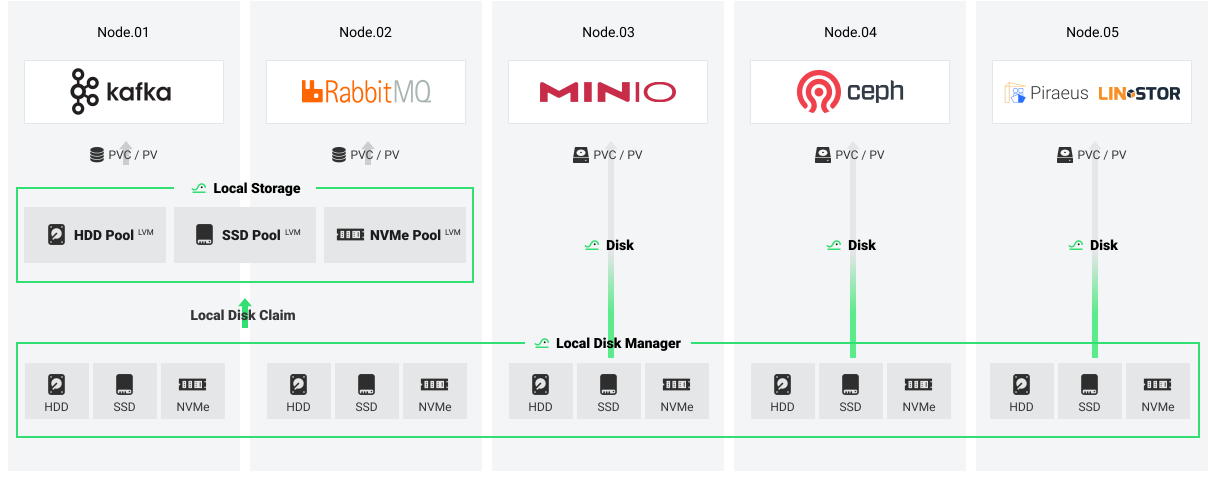
At present, the LDM project is still in the alpha stage.
Concepts
LocalDisk (LD): LDM abstracts disk resources into objects in kubernetes. An LD resource object represents the disk resources on the host.
LocalDiskClaim (LDC): This is a way to use disks. A user can add the disk description to select a disk for use.
Note
At present, LDC supports the following options to describe disk:
- NodeName
- Capacity
- DiskType (such as HDD/SSD/NVMe)
Usage
-
Get the LocalDisk information.
kubectl get localdisk
NAME               NODEMATCH        PHASE
10-6-118-11-sda    10-6-118-11      Available
10-6-118-11-sdb    10-6-118-11      Available
Get locally discovered disk resource information with three columns displayed.
- NAME: represents how this disk is displayed in the cluster resources.
- NODEMATCH: indicates which host this disk is on.
- PHASE: represents the current state of the disk.
Use
kubectl get localdisk <name> -o yamlto view more information about disks. -
Claim available disks.
-
Apply a LocalDiskClaim.
cat << EOF | kubectl apply -f -
apiVersion: hwameistor.io/v1alpha1
kind: LocalDiskClaim
metadata:
  name: <localDiskClaimName>
spec:
  description:
    # e.g. HDD,SSD,NVMe
    diskType: <diskType>
  # the node where disks attached
  nodeName: <nodeName>
  # the owner of the allocated disks e.g. local-storage,local-disk-manager
  owner: <ownerName>
EOF
Allocate available disks by issuing a disk usage request. In the request description, you can add more requirements about the disk, such as disk type and capacity.
-
Get the LocalDiskClaim information.
-
Once the LDC is processed successfully, it will be cleanup by the system automatically. The result will be recorded in the
LocalStorageNodeif the owner islocal-storage.
-